Why a Resume Matters More Than Ever in 2026
In today’s fast-moving digital job market, your resume is no longer just a document—it’s your personal marketing tool. Think about it: before you ever speak to a recruiter, your resume speaks for you. And in most cases, it only has about 6–8 seconds to make an impact. That’s not much time, right? This is exactly why having a professional CV resume template is no longer optional—it’s essential.
Recruitment has evolved drastically. Companies are no longer manually reading every resume from top to bottom. Instead, they rely on technology to filter candidates. This means your resume must appeal to both humans and machines. A poorly structured resume, even with strong skills, can easily get ignored. That’s like having a great product but terrible packaging—no one gives it a chance.
Another key shift is competition. With remote work rising globally, you’re no longer competing with just local candidates. You’re up against talent from across the world. So how do you stand out? The answer lies in presentation, clarity, and strategy—all of which are built into a well-designed resume template.
Let’s be honest—most people struggle with formatting resumes. Fonts don’t align, spacing looks messy, and important details get buried. A professional template solves all of this instantly. It gives your resume a polished, confident look that tells recruiters, “This person knows what they’re doing.”
What Makes a Resume Template “Professional”?
So what actually separates a basic resume from a professional one? It’s not just about looks—it’s about how information is structured and delivered. A professional resume template is carefully designed to guide the reader’s eyes to the most important details first.
A clean layout is the foundation. Imagine walking into a cluttered room versus a well-organized one. Which feels better? The same applies to resumes. Recruiters prefer resumes where sections like experience, skills, and education are clearly defined and easy to scan. No confusion, no unnecessary clutter.
Typography also plays a huge role. Fonts that are too fancy can make your resume hard to read. On the other hand, simple and modern fonts improve readability and professionalism. It’s like choosing the right outfit for an interview—you want to look sharp, not distracting.
Spacing and alignment matter more than most people think. Proper spacing makes your resume breathable and easy on the eyes. Without it, everything feels cramped and overwhelming. A professional template handles this automatically, ensuring perfect balance throughout the document.
Ultimately, a professional resume template is not just about design—it’s about communication efficiency. It helps you deliver your story clearly, confidently, and convincingly.
Key Features of a Modern Resume Template
Modern resume templates are built with both technology and human psychology in mind. One of the biggest features is ATS compatibility. ATS, or Applicant Tracking Systems, scan resumes for keywords before a human even sees them. If your resume isn’t optimized, it might never reach the recruiter’s desk.
A good template ensures that your content is structured in a way that ATS systems can easily read. This includes proper headings, standard fonts, and keyword-friendly sections. It’s like speaking the same language as the system—it understands you better.
Another important feature is customization. Not every job is the same, so your resume shouldn’t be either. A flexible template allows you to tweak sections, adjust colors, and highlight different skills depending on the job you’re applying for. This adaptability gives you a huge advantage.
Modern templates also focus on minimalism. Instead of overcrowding the page, they highlight only what matters. This helps recruiters quickly identify your strengths without getting lost in unnecessary details.
Available Formats Explained
Choosing the right format for your resume is just as important as the design itself. Different formats serve different purposes, and understanding them can make a big difference in how your resume is received.
The Microsoft Word format (.docx) is the most commonly used. It’s easy to edit and widely accepted across industries. If you’re someone who likes making quick changes, this format is perfect for you. You can update details, tweak formatting, and customize sections without needing advanced skills.
The PDF format is ideal for final submissions. It locks your design in place, ensuring that your resume looks the same on every device. Imagine sending a perfectly designed resume, only for it to break when opened—PDF prevents that nightmare.
Advanced formats like AI and EPS are mainly for designers. These allow deeper customization, including layout changes and creative adjustments. While not necessary for everyone, they offer maximum control for those who want a unique touch.
Who Should Use This Resume Template
One of the best things about this professional resume template is its versatility. It’s not limited to one type of user—it works for almost everyone.
If you’re a fresher or student, this template gives you a strong starting point. Even if you don’t have much experience, the layout helps you highlight your skills, education, and potential effectively. It’s like having a guide that tells you exactly what to include and where.
For experienced professionals, the template helps organize years of experience into a clean and structured format. Instead of overwhelming recruiters with too much information, it presents your career journey in a clear and impactful way.
Freelancers, designers, developers—anyone can use this template. Its universal design adapts to different industries, making it a powerful tool for job seekers everywhere.
Step-by-Step Guide to Using the Template
Using a resume template is surprisingly simple, even if you’re not tech-savvy. First, download the template and open it in your preferred software, like Microsoft Word. You’ll see pre-filled sections with sample content—this acts as your guide.
Next, replace the sample text with your own details. Start with your name, contact information, and professional summary. Then move on to your experience, skills, and education. Take your time here—this is where your story comes to life.
Customization is where things get interesting. You can adjust colors, fonts, and sections to match your personal style or industry standards. Just be careful not to overdo it—simplicity always wins.
Finally, save your resume as a PDF before sending it out. This ensures that your formatting stays intact and looks professional on any device.
How ATS-Friendly Resumes Improve Job Chances
ATS systems are like gatekeepers. They decide whether your resume gets seen or ignored. A well-optimized resume can significantly increase your chances of passing this stage.
These systems scan for keywords related to the job description. For example, if a job requires “project management,” your resume should include that exact phrase. A good template ensures that these keywords are placed naturally within your content.
The structure also matters. ATS systems prefer simple layouts with clear headings. Complex designs can confuse the system, causing important information to be missed.
SEO Optimization in Resume Writing
Yes, resumes and SEO have something in common—keywords. Just like websites rank on search engines, resumes rank in ATS systems. Using the right keywords can make your resume more visible.
Focus on industry-specific terms. If you’re in marketing, include words like “SEO,” “content strategy,” and “analytics.” These keywords act as signals, telling the system that you’re a good match for the role.
Common Resume Mistakes to Avoid
Many job seekers unknowingly sabotage their chances with simple mistakes. One of the biggest is overcrowding the resume with too much information. More isn’t always better—clarity is key.
Another mistake is using generic language. Phrases like “hardworking” or “team player” don’t stand out. Instead, focus on specific achievements and measurable results.
Tips to Make Your Resume Stand Out
If you really want to grab attention, focus on storytelling. Don’t just list your responsibilities—show your impact. What did you achieve? How did you add value?
Use action verbs and quantify your results whenever possible. For example, “Increased sales by 30%” is far more powerful than “Responsible for sales.”
Benefits of Using a Pre-Designed Template
A pre-designed template saves time, reduces stress, and ensures professional quality. Instead of worrying about design, you can focus on content.
Comparison: Template vs Custom Resume
| Feature | Template Resume | Custom Resume |
|---|---|---|
| Time Required | Low | High |
| Design Quality | Professional | Varies |
| Ease of Use | Easy | Complex |
| ATS Compatibility | High | Depends |
Real Example Resume Breakdown
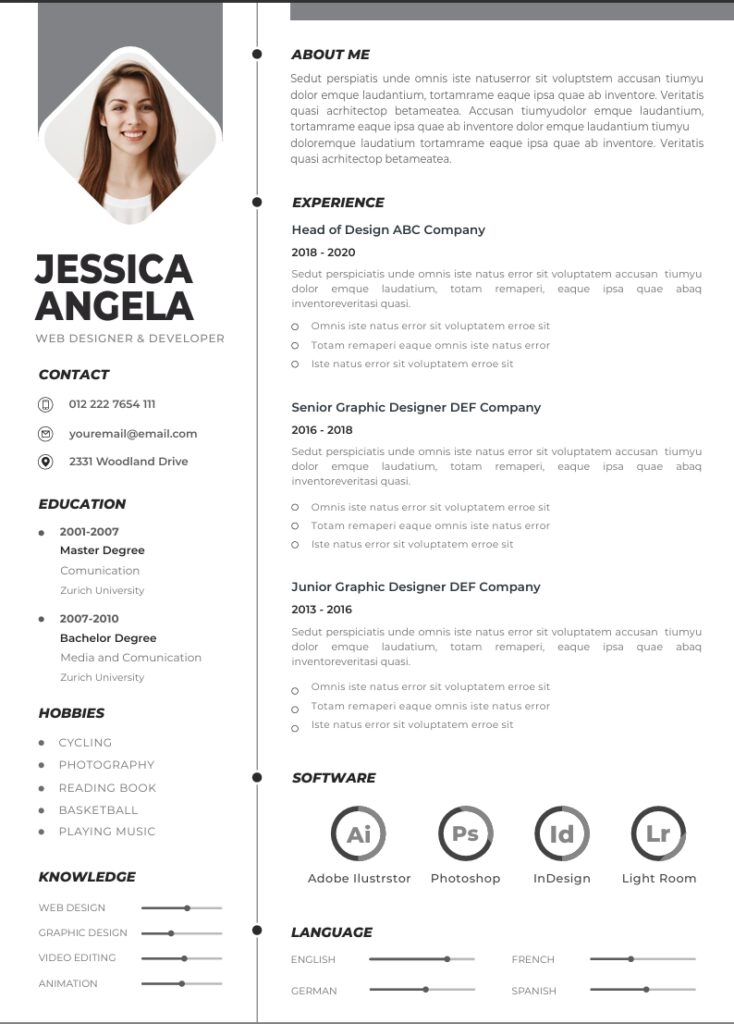
The included sample profile helps you understand how to structure your own resume effectively. Simply replace the content with your details.
How Recruiters Scan Your Resume
Recruiters don’t read—they scan. They look for key sections like skills, experience, and achievements. A good template makes this process easier.
Resume Trends in 2026
Minimalism, ATS optimization, and personalization are dominating trends. Resumes are becoming smarter and more targeted.
Free vs Paid Resume Templates
Free templates offer great value, but paid ones may include advanced features. For most users, a high-quality free template is more than enough.
How This Template Boosts Interview Calls
A well-structured resume increases readability, improves ATS performance, and creates a strong first impression—all of which lead to more interview calls.
Conclusion
Your resume is your gateway to opportunities. With the right template, you can transform a simple document into a powerful career tool. Instead of struggling with formatting and design, you can focus on what truly matters—showing your value. A professional CV template doesn’t just make your resume look good; it makes it work smarter for you. If you’re serious about landing interviews, this is one upgrade you shouldn’t ignore.
FAQs
1. Is this resume template really free?
Yes, you can download and use it without any cost.
2. Can I edit the template easily?
Absolutely, it’s designed for beginners and professionals alike.
3. Is it ATS-friendly?
Yes, the structure is optimized for ATS systems.
4. Which format should I use?
Use Word for editing and PDF for final submission.
5. Can I use this template for any job?
Yes, it’s versatile and suitable for multiple industries.