
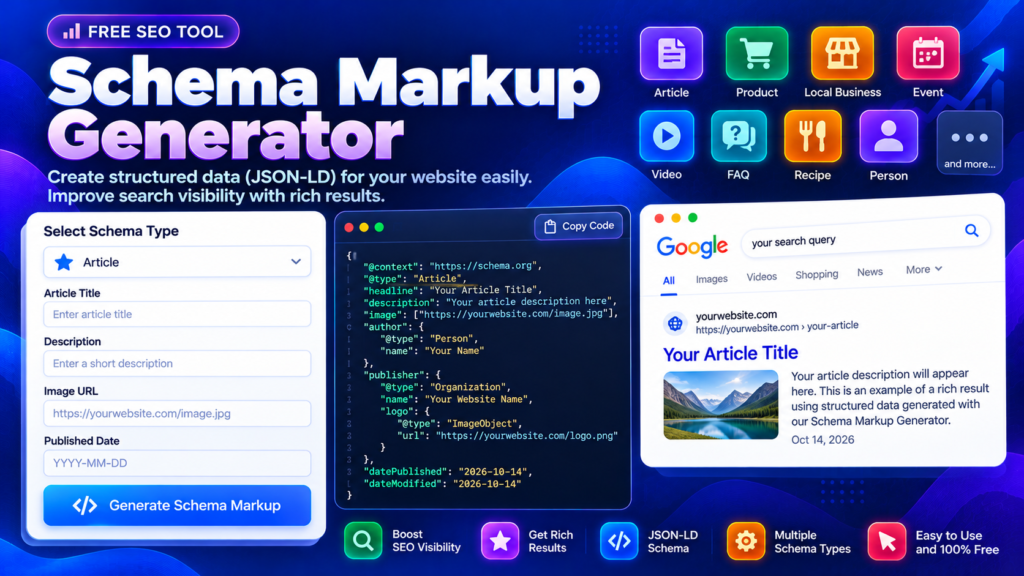
A Schema Markup Generator helps website owners create structured data that describes their page content in a format search engines can understand. Structured data can clarify whether a page is an article, product, organization, website, or another supported content type. This free tool generates JSON-LD markup that you can review and adapt for your website.
Structured data is not a shortcut to higher rankings, and valid markup does not guarantee a rich result. Its purpose is to provide accurate information about content that visitors can actually see on your page.
Schema Markup Generator
Generate valid JSON-LD structured data for Google & Rich Results.
What Is a Schema Markup Generator?
A Schema Markup Generator creates structured data using the Schema.org vocabulary. The output describes information such as a page title, author, organization, product, or breadcrumb trail. This tool supports several common schema types and produces JSON-LD, a structured data format Google recommends when it fits your implementation.
Choosing the correct type matters. An article should use article-related properties, while a product page needs accurate product details. Adding irrelevant or misleading properties can make markup less useful and may affect eligibility for enhanced search appearances.
How to Use the JSON-LD Schema Generator
This JSON-LD schema generator is designed for a straightforward workflow:
- Select the schema type that matches your actual page.
- Enter the page name, URL, description, and other relevant information.
- Add optional data such as images, author details, dates, product prices, or contact information when appropriate.
- For FAQPage, enter visible questions and answers using the provided format. For BreadcrumbList, enter each breadcrumb label and URL in the displayed order.
- Generate the JSON-LD and review every property.
- Copy or download the markup, then validate it before adding it to your website.
Do not fill optional fields with guesses. Accurate, complete data is more useful than adding every possible property.
Common Schema Types You Can Generate
This structured data generator supports multiple types for common website needs.
Article: Describes an article with a headline, description, author, publisher, image, and publication dates when supplied.
Product: Describes a product and can include an Offer when a real price is provided. Product pages must follow the applicable guidelines and show matching information to visitors.
Organization and LocalBusiness: Describe an organization or local business using appropriate details such as its name, URL, logo, telephone, and address.
WebSite: Describes a website and its name and URL.
BreadcrumbList: Represents the breadcrumb path through a site, with items arranged in order.
FAQPage: Represents questions and answers that are present on the page. Always make sure the information marked up is visible and accurate.
Why Schema Markup Matters for Technical SEO
Search engines use structured data as an additional clue about the meaning of page content. Depending on the page type and applicable search features, eligible markup may help a result display additional information. However, search engines decide whether enhanced presentation is appropriate, and they do not guarantee rich results.
A useful schema workflow begins with a correct page and content structure. Choose only markup that represents the page, include accurate required properties, and follow the search engine’s guidelines for the chosen type. Use Google’s Introduction to Structured Data and General Structured Data Guidelines as references.
How to Validate Schema Markup Before Publishing
After generating code, review it for missing information and confirm that URLs, prices, dates, names, and images are correct. Then use Google’s Rich Results Test where the schema type is supported. That test can identify many eligibility-related issues, but it is not a guarantee that a result will display enhanced features.
Once the markup is published, use Search Console reports or URL Inspection where applicable to monitor how Google processes the page. Remember that a general JSON-LD generator checks the structure it creates; it cannot independently verify every Google-specific rule or determine whether the page content meets all requirements.
For a broader technical SEO workflow, you can also use the Robots.txt Generator, XML Sitemap Validator, and SEO URL Slug Generator.
Frequently Asked Questions
Does schema markup guarantee higher rankings?
No. Structured data can help search engines interpret a page, and some markup makes pages eligible for rich results. Neither eligibility nor higher rankings is guaranteed.
Can I use any schema type on any page?
Choose a type that accurately describes the page. Add only details supported by the visible content and the relevant structured-data requirements.
Is JSON-LD better than manually adding HTML attributes?
Google generally recommends JSON-LD when your site setup supports it because it is easier to maintain separately from visible page content. The markup must still be accurate and correctly implemented.
Final Thoughts
A Schema Markup Generator makes it easier to prepare JSON-LD without writing every structure manually. Use it to create a first draft, confirm the information is accurate, validate the output, and only then add it to your site. Correct, relevant structured data is more valuable than generating large amounts of markup that does not reflect the actual page.